External payments
Generally, external Payments are made necessary by internal Charges. For example, if a school Charges a customer $10, and the customer does not have $10 on their balance, then the customer must move money into Dreambound in order to pay the school $10.
Moving money in
Customers can move money in via Stripe card payment. Providers can move money in via Stripe Connect (bank transfer). Either case involves an external Payment.
The external money-in is initiated
First, a normal Stripe PaymentIntent or checkout flow is completed. This is usually one of:
- The customer completes the Stripe checkout / payment intent flow.
- The provider (or Dreambound) initiates a transfer to Dreambound via Stripe Connect.
- Dreambound manually adds money to the payer's account.
The amount to transfer is usually determined by the internal Charges that already exist and are ready to be paid. At this point, no new invoice items are created. A Stripe PaymentIntent may be created, but that's outside the scope of invoicing.
The external money-in is confirmed and the balance is funded
After confirmation is received (e.g. when we receive a webhook from Stripe) we can now reflect the new money in the Payer's balance.
To be specific, we create a Cost, Charge, and Payment. For example, for a $10 card payment from a customer:
- A Cost, from the customer Payer to the Stripe Payer, for $10
- A Charge, from the customer Payer to the Stripe Payer, for $10
- A Payment, from the Stripe Payer to the customer Payer, for $10
Why do we create all 3? One of the rules of invoicing is that the sum of Costs equals the sum of Charges, so we add both a Cost and a Charge. In essence, the customer is "requesting" $10 from Stripe, and Stripe is responding by paying the Customer $10.
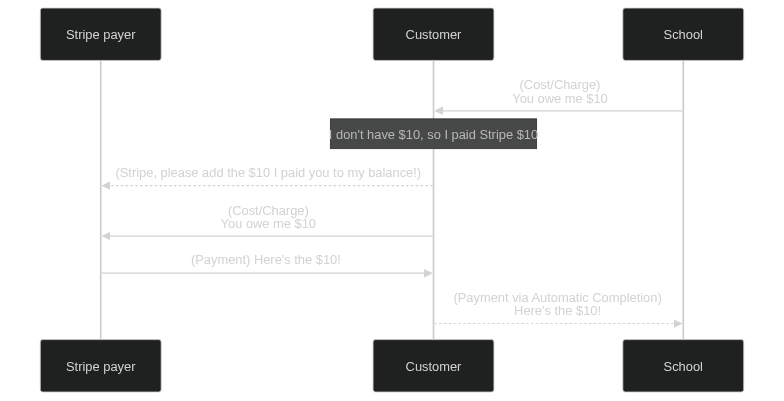
(Optional) Internal Charge is automatically completed
If the money was moved in as a response to an internal Charge, then the internal Charge will usually be automatically completed via automatic completion.
In our example, that means that once the customer receives the $10 Payment from Stripe, the automatic completion system will note that the school is waiting for the customer to pay $10. The school will be paid $10 via an internal Payment.
Some reasons why this may not happen include
- There are no internal Charges awaiting payment -- i.e. the Payer is simply funding their account balance.
- For customers, there are internal Charges but they need more money than has been added -- i.e. the school wants $20 but the customer has only funded $10. We do not partially complete Charges.
Moving money out
Customers can request that money be moved out via Stripe card payment as a refund. Providers can cash out via Stripe Connect (bank transfer). Either case involves an external Payment.
The balance is deducted
The process to move money out is similar to moving money in, except that we do not need to wait for a webhook/confirmation.
We immediately create a Cost, Charge, and Payment. For example, for a $10 payout to a school:
- A Cost, from the Stripe payer to the school Payer, for $10
- A Charge, from the Stripe payer to the school Payer, for $10
- A Payment, from the school Payer to the Stripe payer, for $10
In essence, Stripe is "requesting" $10 from the school, and the school agrees to pay Stripe $10.
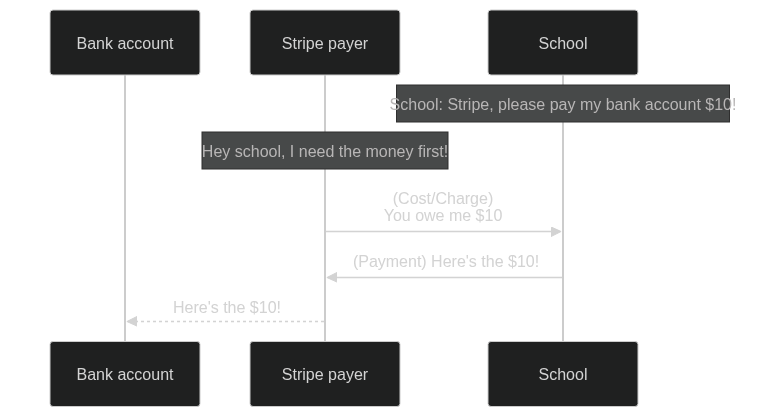
The external money-out is initiated
Now, via API, the money can be paid out. Usually, some metadata about the transaction (like the card or bank account ID to which the money was sent) is added to the Payment metadata -- but that's outside the scope of invoicing.